My Claude Code Experience: Creating an App
Claude Code: What it was like to build an App for Safe Withdrawal Rates (SWR) in retirement.
A few months(6) ago, I started building a retirement planning calculator. Mostly out of self-interest because I recently retired from the Tech industry. So I started building an app to relieve the sheer boredom of intellectual interaction I miss after retiring. The Calc I wanted to build was not a simple "Trinity study - 4% rule" widget, but something a bit more sophisticated, and possibly had more options.
I had a conversation with Todd Tressider at FinancialMentor.com about it because he has his awesome Ultimate Retirement calc, which I use annually, and he has another simple SWR calc on his website. At first, he and I thought I could just give him the new calc code to replace the SWR calc he has, but he stated he has just too much on his plate, so it'll have to wait. Plus, my motivation was a bit different than using a single method- I wanted to see all the academic methods and compare them.
Hopefully, Todd and his community can help with feedback; if not, that is ok too. So I am sharing the results with a larger audience to see what people think, decide whether to pursue something more in-depth, or just keep it as a hobby and add more Claude code apps to my hobby list. This post shares screenshots, architecture, and the site. It's not quite ready.
You can see it here:
https://www.safewithdraws.com/
You can explore the safe withdrawal methods, the learning site, and walk through various scenarios, and hopefully give me a little feedback.
The V1 vs the V3– >Vx ... in More Detail
The APP compares 23 withdrawal strategies, includes return data from historical market crashes, and helps people understand whether their retirement plan would actually work. My v1 was rudimentary and frankly not production-level, so I decided to approach the problem differently after a bit of isolated feedback. This resulted in V3 or v5.... etc.... As you can see, v1 looked like a novice web dev or designer created the site. Well, that makes sense because I am not a designer, and I forced my design thoughts into the first 2-4 tries. You can see that below.
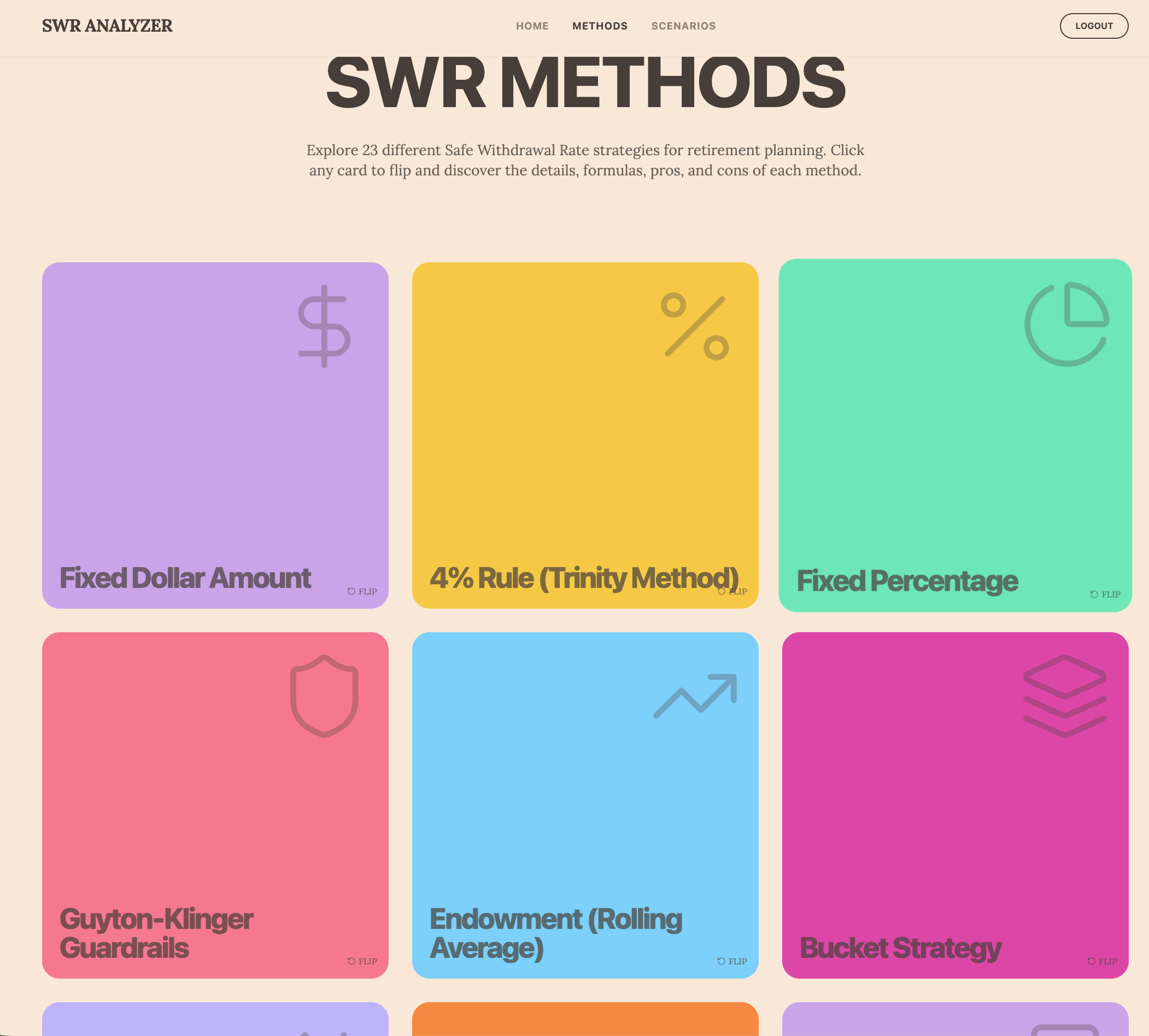
I started building it with Lovable.dev, but I just could not get it to look or dive deep enough. Loveable is a true low-end Vibe coding tool – Prototypes in my opinion. Don't get me wrong – there is a time and place for prototyping. Lovable served a perfect place for this. But it lacked something deeper, and this was comprehensive from design to backend code layers, so I abandoned Lovable and use it mostly as a Test hosting tool for $15/mo. I suspect I will keep this for a while as it does serve its purpose, but I really do not use it enough to justify the $15.
Now, I'm building with Claude Code, Anthropic's AI coding assistant. I use the $100 Max plan because the Plus plan lasted about 1-2 hrs each day before I got rate-limited. I do not get rate limited at anymore. In fact, I never come close. I am going to test this a bit, since there is a daily banding cap you can use with Plus, so I may see what the actual rate limit is for me using this gas-gauge-type tool they have. Maybe I max out at $75/mo vs $100. I am not sure.
Here's what I have learned and what nobody has written much about when building software with AI today: even though Claude Code has written probably 90% of my code, I've spent over 500+ hours( about 6 months) on this project, and I'm only at 85% of MVP well maybe more as of today - I started this article 3 weeks ago and much has improved since then. I had Claude keep track of our work, too, so I know how many hours I have spent.
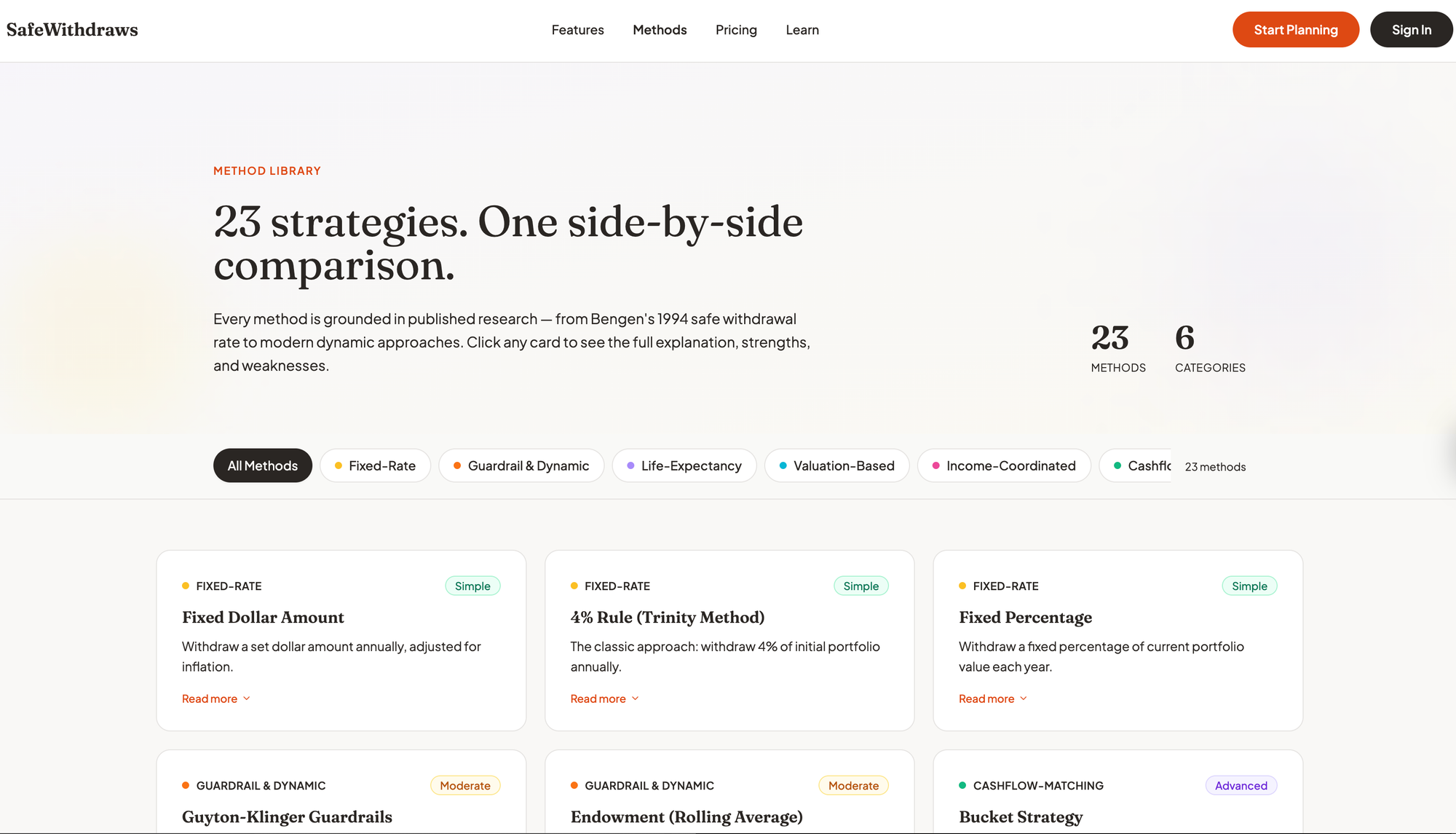
This isn't the story you hear on Twitter(aka X - their branding sucks) and LinkedIn, where someone prompts an AI and gets a working app in an afternoon. While those stories might be true to a point, if I were you, I would not use those apps. The reality is that those apps probably have huge gaps or quality issues, plus most of them look like crap - just my opinion. Below, I try to illustrate what actually happens when you build something with Claude or Lovable. I am not even sure I can get to a point where I can release what you see here. I may abandon the entire project. Ironically, I am not even close to release. But here you get to see a sneak peek. I think my hang-up is that I know what it really takes to release SW, and doing it solo isn't easy. As you can see with the new version its radically updated. I refined my design system prompts and brainstormed style guides with Claude before we refactored the entire site from Lovable's output. Now I think Lovable could do this too but it might take longer. What I used with Claude was two Skills. One called Superpowers for the brainstorming function - it has other sub-skills too, and the Design Agent Skill. Both together working with me, we came up with the below. Which is now the main site.
The Problem With Retirement Planning Tools
Let's start with my goal and why. Most retirement calculators are garbage. Even the UIs are garbage. You can go to Vanguard, Fidelity, private hobbists like me, and many others - they just don't do what you want or need or theu UI's are atrocious. They ask you how much money you have(so does this one), when you'll retire(so does this one), and then they run some Monte Carlo simulation that assumes market returns follow a nice bell curve based on some 60/40 style splits, and then try to model your buy-and-hold scenarios. This one does not use Monte Carlo, and it explains it on the site. They tell you there's an 85% chance you'll be fine. Some do not even ask for this much detail.
But that's not how markets work, and, more importantly, it's not how most of us budget for expenses. The 2008 financial crisis wasn't supposed to happen according to those models. Neither was Covid-2020. Real markets have fat tails, and catastrophic events happen way more often than normal distributions predict. Using buy-and-hold in a passive approach is just insane, too. But I am getting ahead of myself, as the tool I built does not consider how you invest; it only considers the annual sequence of returns from your investments and how much you can reasonably withdraw based on different SWR (safe withdrawal rate) methods. I wanted something to filter out all the noise and see all the methods in one place. Everyone says the 4% rule is the Gold Standard. Well, based on what I am seeing, it's not. Especially if in the first 5-10 years your sequence of returns is in the red. Then the 4% rule can be devastating.
There is then a need to incorporate your actual living expenses into the calculation, which affects your start and end balances each year. I'd like to get this part to a monthly level, but the table just got too big and knarly. Even if these other calculators say you won't run out of money, they don't tell you whether your strategy will actually cover your living expenses when markets tank. There's a huge difference between "your portfolio survived" and "you could pay your bills every year." I suspect what I built is more catastrophe-driven than it needs to be, but what I did give the user is control over annual return rates, so they can model the return sequence. Currently, there is a Return % Override feature, so I have been holding off on adding more bells and whistles.
This is why I found all these other calculators weird: I am no longer a buy-and-hold, mass-market-type investor. I am more active, and my ETF holdings will change dramatically when an economic cycle rotates. For example, I hold no US equities as of Feb 2026 - most other Calculators can't accommodate this and ask for your stock/bond splits or even the types and assume your holding this allocation for 30 yrs. In fact, my holdings do not matter for this SWR scenario planner. I tried to eliminate these configurations because they did not seem important to the methods' outcomes or the scenarios.
What mattered was the portfolio's monthly and annual return %, and how that return compounds over time, and the sequence in which they occurred. So that is why I built a randomization-of-returns feature into the Input screen in the left rail. The "Learn" site talks about this a bit and why I used a bootstrap return engine vs a Monte Carlo engine.
If a user can smooth out returns, reduce drawdowns that need to be recovered, and stay above the positive line for a high percentage of the time, then compounding will get better and better. This is one of the goals of TAA (tactical asset allocation) relative to buy-and-hold. But that was not the goal of this app. At least not yet.
The goal was to see how much I can withdraw annually and, eventually, calculate that monthly from my portfolio, by considering different return scenarios and comparing different withdrawal approaches. FinancialMentor.com teaches much of this theory and has a community of students who are learning these very principles. Todd Tressider is the coach and has been promoting the Expectancy Wealth theory and risk reduction on this site for about 10 years. He is the one who ran across Allocatesmartly.com and has promoted it to his community of students. This tool was exactly the type of system I had been seeking for the last 15-20 years, rather than using a CFP and struggling with buy-and-hold, finger-in-the-wind approaches that most of them suggest.
But there was still a gap for me beyond investing and accumulation with all these sites and tools. I needed something after the fact - what happens next, how much can I spend down, so I wanted to build a tool that would do that, but also learn how to build it using Claude Code or a Vibe coding tool. This scenario tool is educational and:
- Lets you compare sophisticated withdrawal strategies side-by-side.
- Uses actual historical market data, not fairy-tale bell curves.
- Shows you what would have happened if you retired in 1929, 1972, 2000, or 2008 - using historical rates of return that were actual.
- Tells you whether your strategy meets your actual spending needs, not just whether you technically have money left.
- Lets you manually adjust return % line by line if you want to see what the outcomes would be in your balances and expenses.
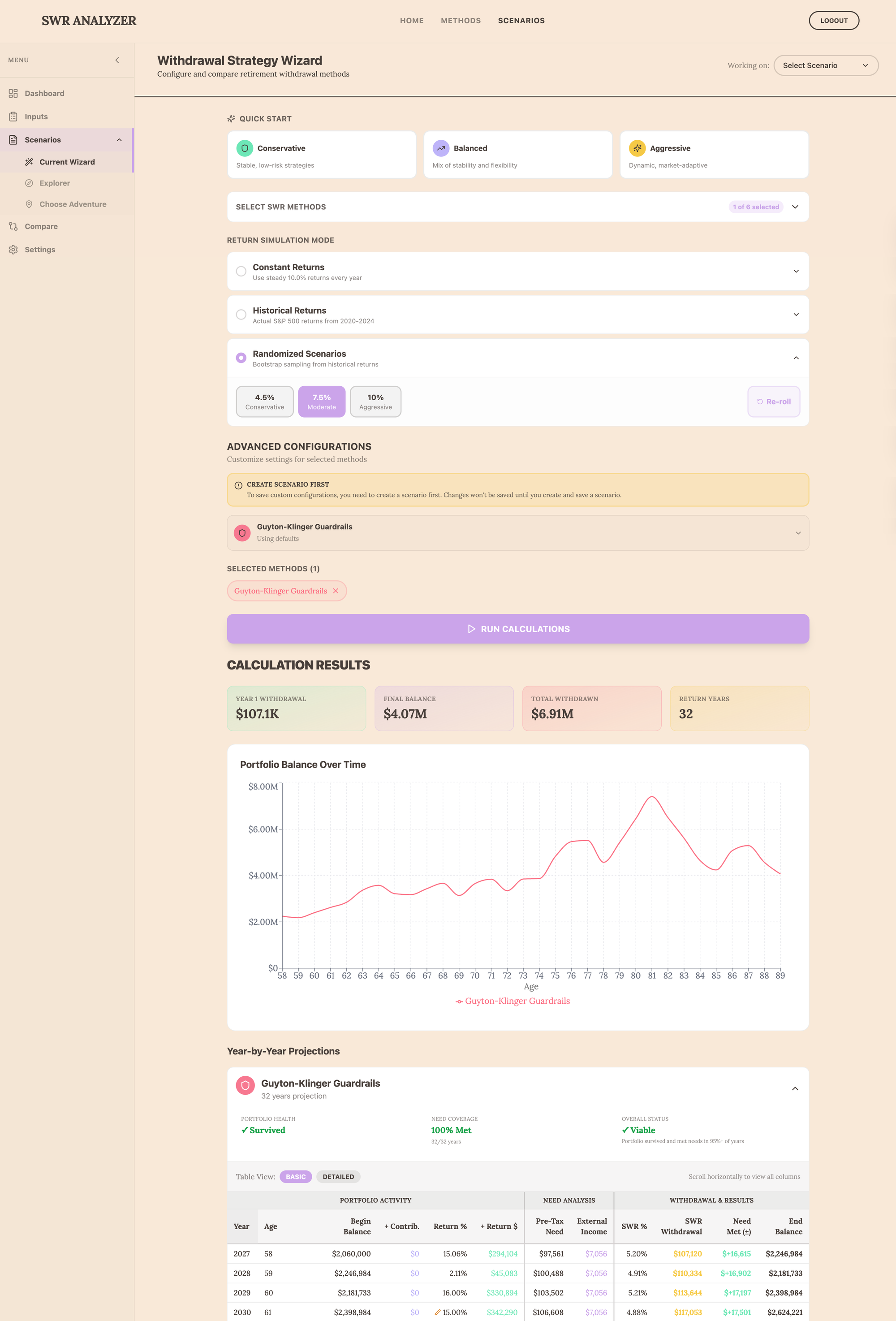
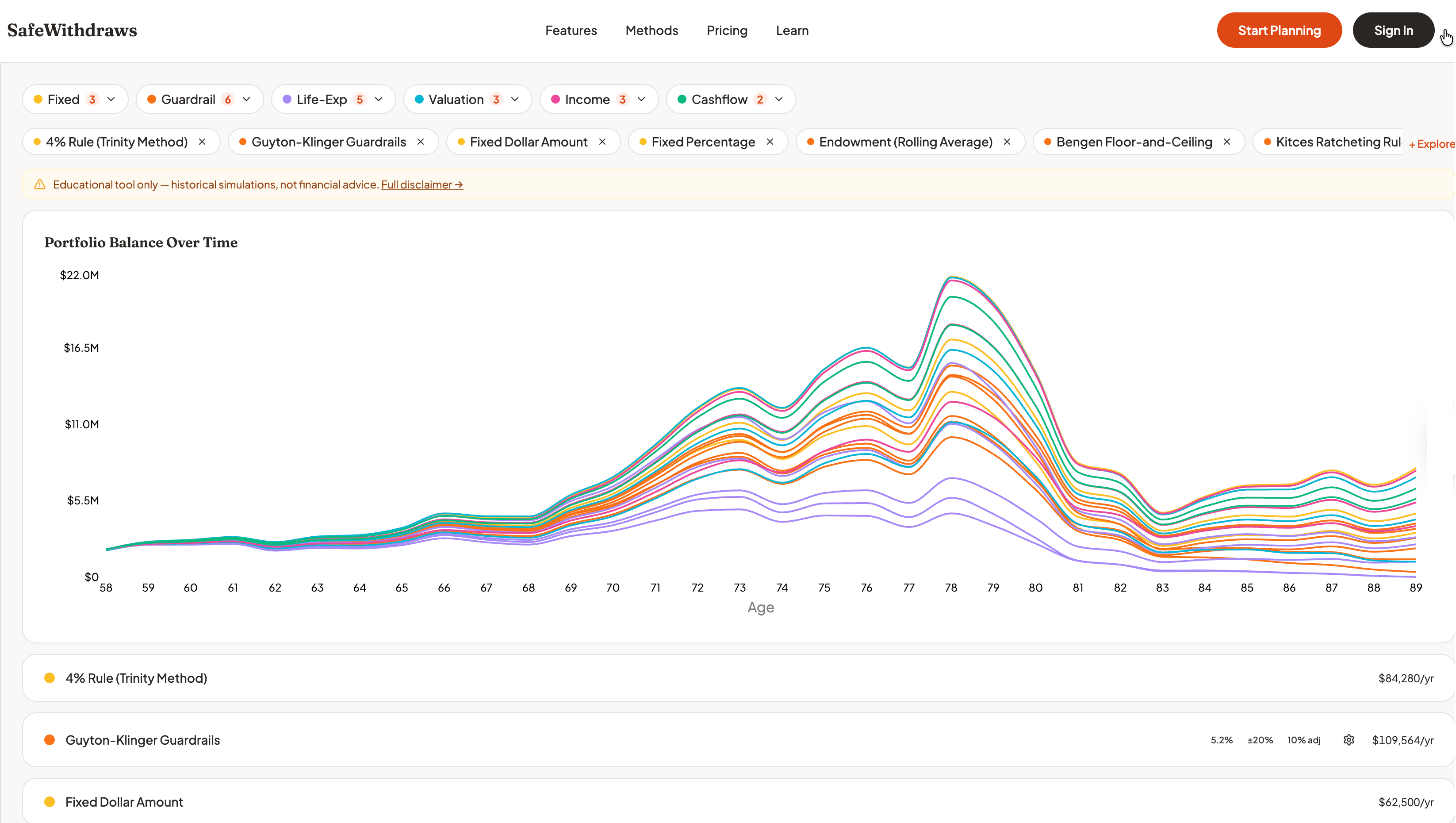
This meant implementing 23 different withdrawal methods—ranging from the traditional 4% rule to complex strategies such as Guyton-Klinger guardrails, Variable Percentage Withdrawal, CAPE-based adjustments, and actuarial approaches. Each one has its own logic, parameters, and edge cases built into the code of the calculator functions, independent of the others. You saw the image above of the library of methods - below is a screenshot of the old and new primary wizard. My plan is to add more tools, including one that uses AI, so users can have conversations about their pre- and post-retirement planning.
What Claude Actually Does (And Doesn't Do)
Claude Code is remarkable. When I give it a clear specification, it writes clean Strict TypeScript faster than I can read it. It follows patterns, implements algorithms correctly, writes tests, and refactors code without breaking things. It can even build comprehensive requirements documents and rollback plans if those code updates do not work out as planned.
But here's what I've learned: AI doesn't know what to build. It only knows how to build what you tell it to build via those plans.
DESIGN, DESIGN, DESIGN is the KEY
Before Lovable and Claude wrote a single line of code, I had to figure out the architecture. Obviously, I am biased towards this approach as this was my career. haha.
- How should the calculation engines work?
- What data structure represents a withdrawal strategy?
- How do user inputs flow through the wizard into the calculator and back out as results?
- Should I use Redux for state management or just React Context?
Oddly, I only had to give thoughts on this, not the actual details I would have had to do in my previous 25-year career. But knowing these types of requirements are needed is key to getting any Vibe Coding tool to give you what you want, with deep sophistication rather than complexity.
Tech Stack
Once I had imported and migrated to my local machine, Claude and I settled on a clean architecture in which each withdrawal method implements a simple interface. A user provides input, and it returns year-by-year projections. But designing that interface required understanding what every method would need: ages, portfolio values, Social Security timing, tax rates, external income, return assumptions, and method-specific configurations. I'm probably still not 100% where I need to be, but it's getting closer. I am not a front-end designer, so I had a little help and leveraged some free style guides and fonts, but I also needed a template or design that worked for the masses if I decided to release this. I am still not all that happy with it, but if you know me, I will probably never be satisfied with my own work. If you have color, UX flow, or Ui design and think there is a better mousetrap, feel free to shoot me a note.
Return Randomization
I mentioned this above. Claude and I discussed how to include a feature that allows the user to randomize future annual returns for the portfolio without relying on Monte Carlo or another portfolio optimization engine.
We initially used an academic method called IID Bootstrap. This worked, but each re-roll (changing the randomization) would result in too many severe peaks and valleys. This did not matter for a constant return or for the historical benchmarks. For Randomization, though, I had an issue, and I needed a better, more academic approach - even though I went against academia with the manual row-by-row override that the user can apply.
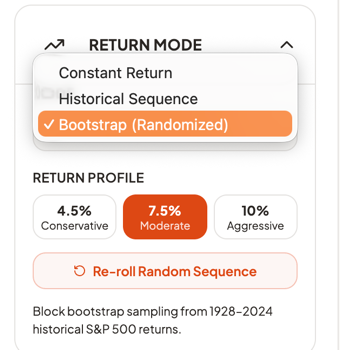
The core issue: The IID (independent) bootstrap with drift adjustment was not industry-standard and produced unrealistic extremes. Monte Carlo is the industry standard.
What my research with Claude revealed is what the industry does:
- Boldin - Uses normal distribution Monte Carlo (1,000 iterations with mean + stddev). I like this tool for all the features it has and I have subscribed to it in the past.
- Portfolio Optimizer - Uses block bootstrap (samples consecutive years together). This is what we ultimately ended up using, too. This a good tool too.
- Academic consensus - IID bootstrap is "too random" because it breaks autocorrelation (crash years naturally followed by recovery years). We started with this but it just didn't output well and the drift was too extreme.
Why our initial IID bootstrap drift was problematic: No other tool we found uses unlimited drift adjustment. If we randomly sample multiple crash years, the drift can be +15 % to +45 %, turning normal years into unrealistic +60% returns, and the same in reverse for negative % years. While we still achieved our average CAGR over the retirement year, the extremes caused dramatic SWR on both sides of the fence for some methods vs. others.
Four Options
Here is what happened when I switched from IID to Block Bootstrap. I had Claude build a separate code file to make it easier to change the returns engine if needed. I didn't think we needed a more complex approach because we give the user full override ability on a line-by-line basis. So if the engine outputs 60% and does not apply drift, the user can override it. However, some portfolios do get 60% some years, and some see drawdowns of 50+%, so we needed those options. More catastrophic thinking on my part. haha.
Context
Our 1st bootstrap sampling produced unrealistic return sequences when randomly sampling individual years and applying drift adjustment to hit a target mean; we got extreme distortions (e.g., a -37% crash year + 18% drift = artificial extremes throughout the sequence).
Goal: Replace the IID bootstrap with the Block Bootstrap approach to preserve realistic crash-recovery patterns while still providing randomization.
Design Decisions
Block Size: 5 Years
- Academic literature suggests optimal = data_size^(1/3) ≈ 4.6 for 97 years
- Captures typical bull/bear cycle
- 2008 crash + 2009-2011 recovery stays together
Mean Targeting: Rejection Sampling with Capped Drift Fallback
- Generate block bootstrap sequence
- If mean within 1.5% of target → accept
- Retry up to 20 times
- If all fail → apply small drift (max 2%)
Expected Behavior by Preset
Here are the 3 types of return options we chose to include for the user to run simulations. We also allowed re-roll and row by row override adjustment. You can only choose one type and one option within the panel drop down you choose.
We gleaned our approach from these sources:
- Kitces: Monte Carlo Simulations
- Capital Spectator: Block Resampling
- Portfolio Optimizer: Bootstrap for Financial Planning
The Superpowers Skill: Strategic Thinking Meets Tactical Execution
I've been using a custom Claude Code Skill(called a capability plugin in Claude Code) called Superpowers (https://github.com/obra/superpowers), which has changed how I work. It's not about making Claude a better coder; it's about making me think more systematically about planning and design, and this is where Superpowers is, well, a Superpower.
Here's how it works. When I have a complex feature to build, I start with brainstorming mode. Not "Claude, implement this feature," but "Let's think through this together." What are we trying to accomplish? What are the constraints? What could go wrong? What approaches make sense?
This produces a detailed plan and not vague intentions, but specific tasks with acceptance criteria. Then I use the execution mode to work through the plan task by task.
Example: I wanted to add TypeScript strict mode to my project. Without a plan, I would have just enabled it and spent days fighting random compiler errors - obviously Claude would have worked through these but Superpowers saved hours of time.
Claude executed the plan perfectly, touching 66 files without breaking anything.
The Superpowers skill doesn't do the thinking for me. It structures my thinking so it can be translated into action. Strategic planning before tactical execution. This helps with Claude's memory too and keeps it on track vs going rabbitholes or causing undue complexity.
The Bug That Slipped Past 83 Tests
In January, I had 83 passing tests. Everything worked. I was feeling good.
Then I actually used the application. It was completely broken. Three critical bugs:
- The simulation mode setting wasn't being passed to the calculator
- Return overrides weren't flowing through the calculation pipeline
- The success metrics weren't showing up in the results
How did 83 tests miss this? Because they were all unit tests. They tested individual functions perfectly. They didn't test whether the data actually flowed correctly from the UI through the state management into the calculation engine and back out to the display.
This was humbling.
What Takes 500 Hours When AI Writes The Code?
You might be curious. If Claude writes 90% of the code, what am I doing for 500+ hours?
- Understanding the domain. I studied withdrawal strategies, historical market data, CAPE ratios, and actuarial methods. None of this is coding, but without it, I couldn't specify what to build.
- Making architectural decisions. Should calculations run in a Web Worker? What's the right abstraction for method configurations? These decisions affect everything downstream and are captured in a living Architecture document.
- Designing the user experience. Sliders or dropdowns? How do you present 30 years of projections without overwhelming users? This required balancing personal taste against best practices — the hardest judgment call in the project.
- Writing specifications. "Implement Guyton-Klinger" isn't a spec. I had to research the original paper, decode the guardrail mechanics, decide which parameters to expose, and design test cases. Claude and ChatGPT helped translate the academia into plain language, which I consolidated into a large document repository.
- Debugging integration issues. Unit tests passed, but the app didn't work. Data wasn't flowing correctly between components. Tracing these issues required understanding the full system — and took two full weeks that nearly made me abandon the project.
- Maintaining quality. Writing tests, reviewing Claude's code, catching edge cases. This is largely manual and iterative. Anyone claiming they shipped a polished app in 10 hours is either not being honest or shipped something they shouldn't be proud of.
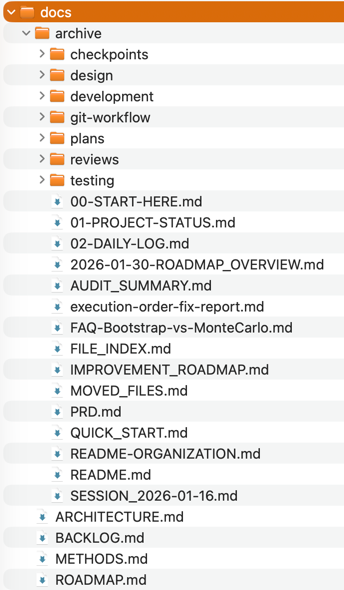
- Documenting everything. Extensive docs — architecture, method explanations, daily work logs, implementation plans — aren't busywork. They're how I maintain context across sessions and keep Claude effective. Without this discipline, I couldn't have accomplished 10% of what I have.
What Still Needs To Happen
I'm at 85% MVP - maybe, that's probably optimistic. The code works. But production-ready software isn't just code that runs.
I still need to:
- Done as of today - Deploy to Vercel with proper routing, CDN configuration, and security headers - this happened this week.
- Done: Set up monitoring (error tracking, analytics, performance)
- Done: Build a CI/CD pipeline (automated testing, linting, deployment)
- Done: Write user documentation (getting started guides, method explanations, tutorials)
- Done: Do a security audit (XSS vulnerabilities? CSRF? Rate limiting?) We aren't using a database yet like Supabase so most of these deeper test are not necessary yet.
- Delayed: Add authentication (planning to use Supabase) - right now all inputs are stored in localStorage on the users machine.
- Delayed: Build out the pre-retirement accumulation feature (show your full financial journey)
- Many more - if I decide to move forward with the tool. Which i am stil not sure I want to.
None of this is coding in the traditional sense. It's DevOps, security, technical writing, and systems administration. Claude can help with configurations and scripts, but I need to understand what production readiness means.
What I've Learned About my Human-Claude Code Partnership
After 500+ hours on this project, here's what I believe:
AI hasn't made software development easy. It's made it different.
- Before: Slow implementation, lots of time on syntax, tedious refactoring, writing tests was grunt work.
- After: Fast implementation, minimal time on syntax, automated refactoring, writing tests is still grunt work (but faster).
- What hasn't changed: Understanding the problem domain. Designing the architecture. Making UX decisions. Debugging integration issues. Maintaining quality.
Obviously, I am not doing this justice, and anything I write to describe it doesn't come close to what is really happening day to day, but it is a good snapshot.
- The work has shifted from implementation to specification.
- Good architecture is force multiplication for AI.
- Quality is a relentless discipline, not automatic.
The Uncomfortable Truth
There's a narrative I keep reading that AI will soon build entire applications from a single prompt. Maybe that's true for simple CRUD apps, but it's far from the real truth and more likely Tech-bro hype. I am not saying it's not being done - it probably is, but the hype is bordering on Crypto/BitCoin-level nausea to me. This narrative needs to stop - the hype cycle is becoming obnoxious, and the tech industry is losing credibility. I have more to say about the industry, but I won't say it here or in other articles because it doesn't change the momentum and trends in the industry. Nor will it change the personalities driving this obnoxiousness.
What I've learned is that the human is still the irreplaceable element:
- Vision - What should this thing do and why?
- Architecture - How should it be structured to evolve gracefully?
- Judgment - Which of these three approaches is best?
- Taste - What makes this interface intuitive vs. confusing?
- Quality - Is this actually good enough to ship?
- Domain expertise - Does this implementation match the theory?
Claude Code has been an extraordinary partner. It's written most of the code, saved me hundreds of hours, and produced cleaner code than I could have ever written myself. Drop me a line if you want to chat. I have lots of time on my hands since retiring.
Travis Giffin is building SWR Scenarios @ https://safewithdraws.com , a retirement planning tool. You can reach me at travisgiffin1122@gmail.com.